Tapestry logos, colors, and fonts follow a single standard.
This page is for individuals who create materials bearing the Tapestry name, including staff, teachers, administration, and families. It outlines our logos, color schemes, and fonts, and provides guidelines for using AI tools in Tapestry projects. If you have any questions not addressed here, please contact Mr. Patel.
Approved Logos
We have three logo variants across two distinct layout options: Tapestry (main/central office), Tapestry DeKalb, and Tapestry Clayton. Each variant is available in both horizontal and vertical orientations, in color and in white. Use only the approved logo for the specific campus or office being represented. Do not combine, stretch, recolor, or apply effects such as shadows or outlines to the logos. Do not use AI tools to generate logo variations. Always use the logos in their original formats below.
Main Office Logo
Use for anything representing the school system as a whole, central office communications, districtwide materials, and our main website.
DeKalb Campus Logo
Use for anything specific to the DeKalb campus, DeKalb admissions, events, and campus communications.
Clayton Campus Logo
Use for anything specific to the Clayton campus, Clayton admissions, events, and campus communications.
Color Palette
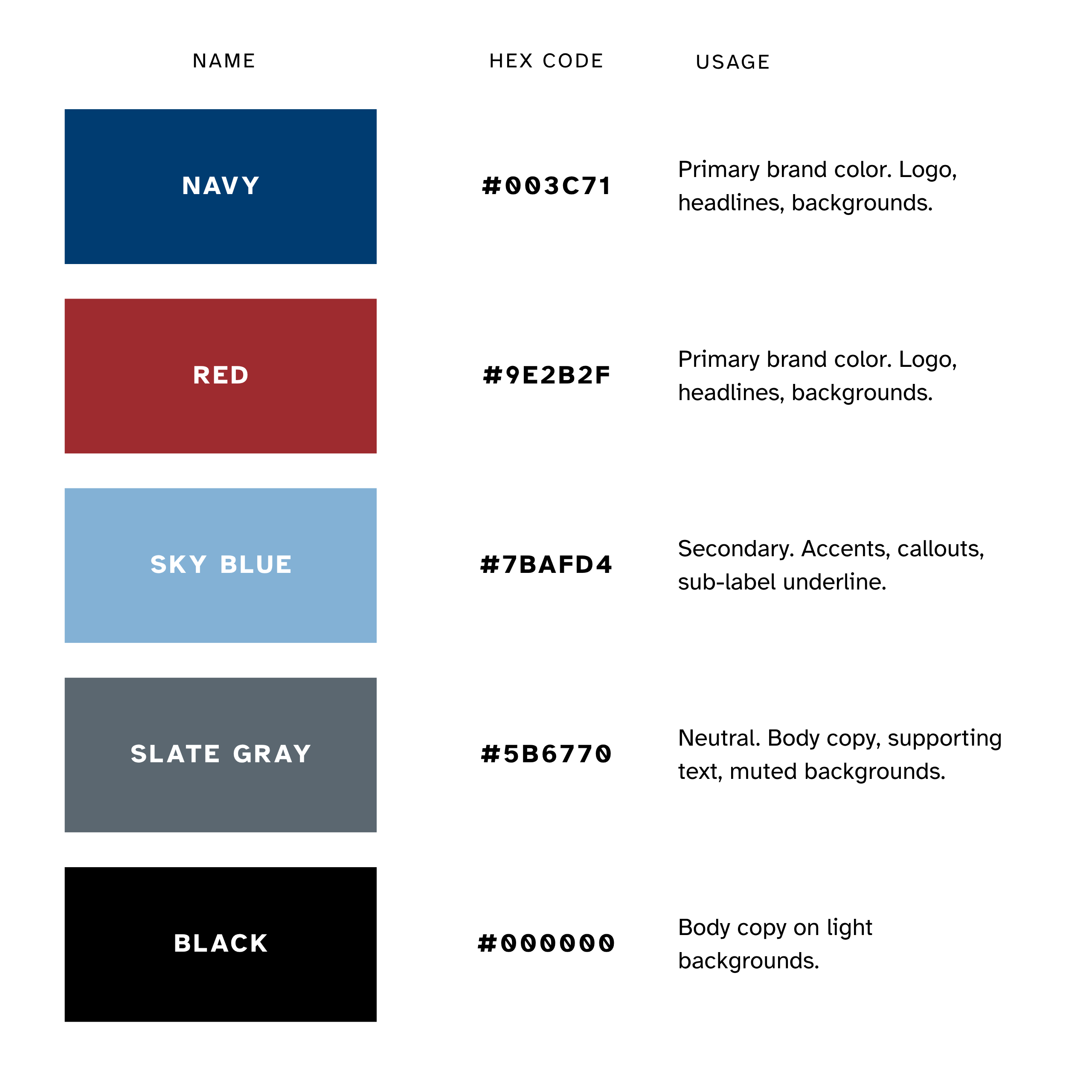
These are the only approved brand colors. AI design tools will often guess at a school’s colors or generate close-but-wrong shades of blue and red. Always pull the exact hex codes rather than letting a tool estimate them.
Typography
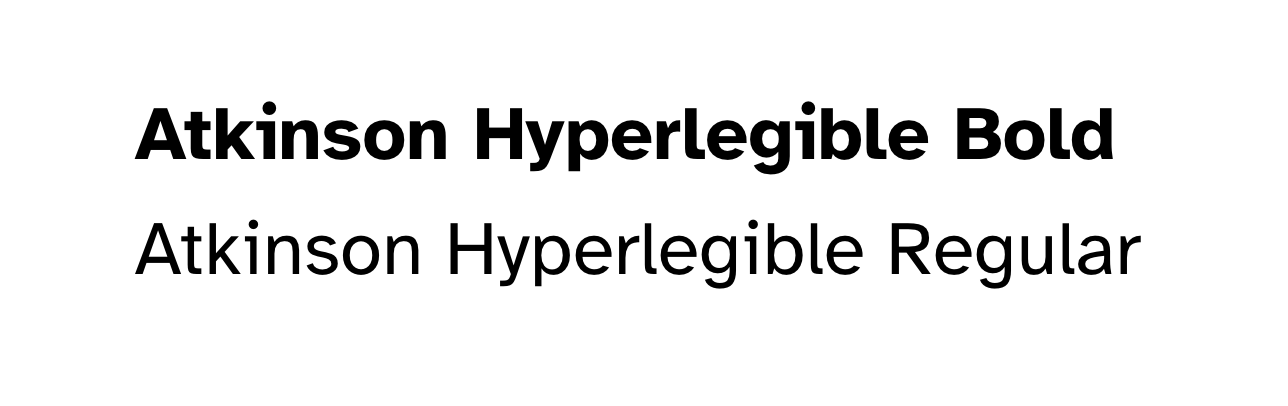
Tapestry’s typeface is Atkinson Hyperlegible, developed by the Braille Institute specifically to improve readability for people with low vision. It’s a deliberate accessibility choice, not just a style choice, so use it consistently everywhere.
Where to find it
Atkinson Hyperlegible is a free, open-source font built into Google Fonts, which means it’s already available natively in Google Docs and Google Slides. Staff doesn’t need to install anything: search “Atkinson Hyperlegible” in the font dropdown in Docs or Slides, then select it.
In Canva, search the same name in the font picker. If it doesn’t appear, it can be added as a brand font in Canva’s Brand Kit, so it’s available by default on every new design.
Accessible font sizes for small-format print
These recommendations follow clear print accessibility guidelines used across the field (RNIB, CNIB, and similar accessibility bodies consistently point to the same ranges). They apply anytime something is going to print, whether it’s built by hand or drafted with an AI or Canva template first.
FLYER OR HANDOUT
– Body copy: 12pt minimum, 14pt recommended
– Headline: 18pt minimum, 24–36pt recommended
– Applies to every line of body text, not just the main paragraph
BROCHURE OR TRIFOLD
– Body copy: 12pt minimum, 14pt recommended
– Keep lines to 50–75 characters. Use one column per panel, not two
CAPTIONS, FOOTNOTES, FINE PRINT, CONTACT INFO
– 12pt minimum, 12–14pt recommended
– Never drop below 12pt, even for the smallest line on the page
TABLE TENT OR SMALL INFO CARD
– 14pt minimum, 16–18pt recommended
– Read at a short distance but often in passing, so err on the larger
POSTER OR SIGN (no guaranteed viewing distance)
– 26pt minimum for the smallest text, 26pt+ recommended
– Scale the headline up well beyond this
BUSINESS CARD
– 8pt minimum, 9–10pt recommended
– The one exception to the 12pt floor: prioritize contrast and a simple layout to compensate
LAYOUT RULES
– Left-align body copy; avoid centered or justified text
– Line spacing at least 1.5x the font size
– Avoid setting body copy in all caps; use bold for emphasis, not italics
– Keep strong contrast between text and background
– Use a matte, non-glossy finish when possible
Using AI Tools to Create Tapestry Materials
This section establishes requirements for the use of AI tools in creating Tapestry materials, including flyers, posters, social media graphics, and slide decks.
AI tools may be used to draft text and generate layout ideas, however they may not be used to determine colors, fonts, or the logo. These elements are defined in this document and must be used exactly as specified, regardless of what an AI tool generates or suggests.
AI tools do not have access to Tapestry’s brand standards unless the standards are provided directly. A prompt such as “Tapestry colors” or “make a school flyer” will produce an approximation, not the correct result. The exact specifications in this document must be used in place of any AI-generated default
What AI tools are okay to use for
- Drafting or rewording text: a flyer headline, a social caption, a slide’s talking points.
- Brainstorming layout ideas or content structure before building the real thing.
- Resizing or reformatting a document, as long as the visual brand elements themselves aren’t being regenerated.
- Translating approved copy into Spanish for a first pass, with a fluent speaker reviewing before it goes out.
What AI tools should never decide
- Colors: always pull the exact hex codes from Section 3, never let a tool pick or approximate a color.
- Fonts: always use Atkinson Hyperlegible, never whatever font the tool defaults to.
- The logo: never regenerate, redraw, or recreate it with AI image tools, including “just to resize it” or “clean it up.” Always pull the actual logo file.
- Layout templates for recurring materials: use the approved templates instead of generating a new layout from scratch each time.
Requirements by Material Type
All materials must be sent to Mr. Patel for approval before being published or shared.
Flyers and posters
Use an approved template when one exists. If no template covers the need, build the layout using the colors, type, and logo files specified in this document. Do not use an AI tool to generate the complete design. AI-generated design tools frequently produce an incorrect color palette and typography even when instructed to match the brand. Any AI-generated flyer must be treated as a draft and rebuilt with the correct brand assets before use.
Social media graphics
AI tools may be used to draft captions or suggest content to highlight. The graphic itself must be built from an approved template or created directly with the brand colors and typeface. AI-generated graphics frequently use an incorrect shade of blue or a generic sans-serif font in place of Atkinson Hyperlegible. These deviations are easy to overlook but affect brand consistency across all channels.
Slide decks
AI slide generators (including built-in tools in Google Slides, Canva, and similar apps) are the most common source of accessibility problems: low-contrast text on busy backgrounds, tiny font sizes to fit more content, and color combinations that fail in contrast. Before presenting or sharing any AI-assisted deck:
- Confirm the font is set to Atkinson Hyperlegible, not the tool’s default.
- Confirm the logo is the real file, not a redrawn or AI-generated version.
- Check that body text is large enough to read from the back of a room
Anything built with AI assistance and headed to families, the community, or outside the school should get a quick brand check before it goes out. Send it to Mr. Patel for a look, the same as any other Tapestry material.
Branding FAQs
They apply to anyone creating something with the Tapestry name or logo, including staff, teachers, administration, PTA, and other parent volunteers.
Yes, within limits. AI tools can help draft text or brainstorm layout ideas. They cannot be used to generate the logo, choose colors, or select a font. Always pull those directly from this page instead of what the tool generates or suggests.
Download the correct logo for your campus or office from the Logos section above. Do not screenshot a logo from another flyer, and do not recreate or resize it using an AI image tool, even to “clean it up.”
Use the Main Office logo for anything representing Tapestry as a whole, including districtwide materials. Use the DeKalb or Clayton logo for anything specific to that campus. Don’t combine campus logos on the same piece.
No. Please don’t create a modified version of the logo (new colors, added graphics, a different shape). If you think a piece needs something like that, contact Mr. Patel.
Atkinson Hyperlegible. It’s free and built into Google Fonts, so it’s already available in the font menu in Google Docs and Google Slides. In Canva, search for it in the font picker, or add it to your Brand Kit so it’s there by default.
See the Color Palette section above for the exact hex codes. Please don’t guess a color from memory or let an AI tool pick a close match. Small color shifts are easy to miss but show up quickly once materials are side by side.
Yes. All materials, regardless of size or format, need Mr. Patel’s approval before they’re published or shared, including social media posts.
If it hasn’t been published or shared yet, check it against the standards above and make any corrections needed before sending it to Mr. Patel for approval.
Use real photos of our campuses and students whenever possible. If you’re not sure whether an image is appropriate to use, contact Mr. Patel before including it.
Yes, but it’s not complicated in practice. Use the correct logo, the correct colors, and Atkinson Hyperlegible. A simple flyer built with the right elements will always look more like Tapestry than a polished one with the wrong ones.
Yes. Social graphics need to use the approved colors and font the same as printed materials, and go through the same approval process before posting.
No. Both campuses use the same colors, font, and overall system. The only difference is which campus logo you use.